

Blog
How to Create a Treasure Map with Google Maps for a…
How to Create a Treasure Map with Google Maps for a Scavenger Hunt scavenger hunt for kids
Last updated: April 2026 | Reading time: 3 min
This guide is based on years of hands-on experience designing and running scavenger hunts for kids of all ages. Every idea has been tested with real families to ensure maximum fun and engagement.
Creating your own treasure map is an exciting adventure for kids — and it instantly makes any scavenger hunt feel more magical. With a digital map service like Google Maps, you can turn familiar places in your neighborhood into a personalized treasure map — whether it’s a park, a playground, or a little woodland trail your family loves. Here’s a simple step-by-step guide on how to create your treasure map using Maps and customize it with fun details.
Step 1: Choose the Perfect Location
Choose a scavenger hunt location that kids can safely explore and that offers enough room for different clue stations. Here are some great options:
- The local park: Trees, paths, benches, and gazebos offer endless opportunities for fun challenges.
- A nearby wooded area: Perfect for hiding treasure between trees or adding nature-themed tasks.
- A playground: Swings, slides, and climbing frames can easily become clue stations.
- Your own backyard: A great option if you prefer a private, easily controlled environment.
Step 2: Create & Edit Your Map in Google Maps
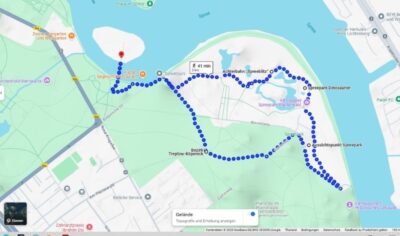
- Open Google Maps: Visit the Google Maps website or open the app on your phone or tablet.
- Search your location: Enter the area where your scavenger hunt will take place. Zoom in until all important landmarks are clearly visible.
- Draw your route: Use the drawing tool in Google Maps (or any route planner) to sketch out the scavenger hunt path. Add the route before taking your screenshot.
- Take a screenshot: Capture your finished map with the route included.
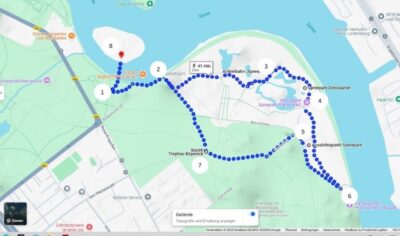
- Edit the image: Open your screenshot in an editing tool (Paint, Canva, or any online editor). Add your clue stations using fun icons like treasure chests, stars, tents, or footprints.
- Add playful icons: To show kids what type of challenge awaits them, include small symbols such as:
-
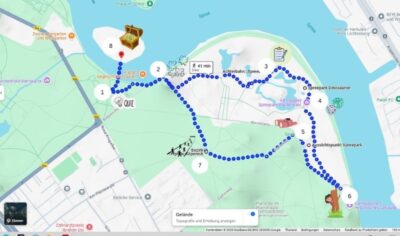 A question mark for a quiz challenge
- A jump rope icon for an active movement task
- A compass for a navigation or orientation challenge
- Give it an antique look: Want your map to feel like an old pirate treasure map? Add vintage textures, warm brown tones, or parchment-like patterns. You can even print the map and brush it with tea for a real “ancient treasure scroll” look. More ideas here: DIY Treasure Map
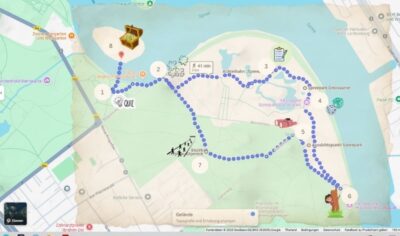
- Cut & laminate: Cut your treasure map into the desired shape. Laminating it makes the map sturdier and kid-proof, especially outdoors.
Step 3: Creative Ideas for Your Clue Stations
Here are some fun station ideas you can place on your map:
- Park bench: Hide an envelope with the next clue taped underneath.
- Gazebo: Send kids to find a word or number on a sign as part of a puzzle.
- Playground: Add a mini skill challenge — like balancing, jumping, or counting steps.
- Fountain or pond: Hide a small object nearby that kids must search for.
- A uniquely shaped tree: Kids must locate the tree and count its branches.
Step 4: Presenting the Treasure Map
Before the scavenger hunt begins, show the kids their treasure map and explain how it works. Build excitement with a short story, such as:
“Many years ago, a mysterious explorer hid a secret treasure somewhere in this area. No one has ever found it — until today! You’re the first to hold the treasure map. Follow the clues, solve the challenges, and uncover the hidden prize!”
Hand over the map and let the adventure begin. A well-designed treasure map makes any scavenger hunt unforgettable!
Conclusion: Creating a Treasure Map with Maps – Simple, Fun & Full of Adventure
Designing your own treasure map with Google Maps is easy — and it turns your scavenger hunt into a truly immersive experience. By marking real-life places like benches, gazebos, or special trees, the adventure feels more realistic and exciting for kids. Give it a try and create a magical memory they’ll never forget!
Looking to make a classic hand-drawn treasure map instead? Check out our guide on how to make a treasure map with children – a fun DIY alternative!
Forest Treasure Hunt
Printable scavenger hunt — print at home, play in minutes. Includes clues, treasure map, certificates & more.